
Verizon Wireless hooks up the The Dark Knight edition Nokia 6205
The new Batman movie will be hitting theatres soon, well July 18 actually, and to celebrate the arrival of the newest Caped Crusader movie Verizon and Nokia are releasing a special edition of the Nokia 6205 clamshell mobile phone (Holy Smokes Batman!)
The special edition Nokia 6205 comes in “mysterious black colour” and is embellished with a subtle “The Dark Knight” emblem, the dark knight being Batman of course. The Bat “Mobile” includes preloaded themed wallpapers animated screensavers, voice tones and a full Batman movie trailer, for all you Bat fans out there.
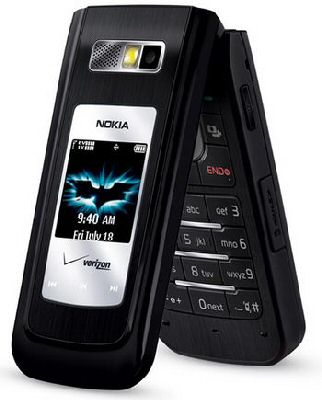
Bat spec wise “The Dark Knight” Nokia 6205 Get-It-Now enabled mobile phone is identical to the original with 1.3 megapixel camera, VZ Navigator, Mobile Web, Bluetooth, 58MB internal memory, and the trusty microSD slot.
Inside the Nokia 6205 “The Dark Knight” special edition retail box the owner will find a Joker playing card, only that card is a code and a link to the FightForGothamCity.com website, once there the owner can play game and hopefully win more The Dark Knight themed goodies, furthermore the owner can download exclusive content from Verizon’s V CAST service.
Bat fans can gain The Dark Knight special edition Nokia 6205 by online purchase for a Batlicious price of $69.99 after a $50.00 online instant rebate with a two year agreement…Kapow!!
Zip out of the Bat cave and grab your Caped Crusader Bat phone A.S.A.P Bat fans.
Source — intomobile
Comments
One thought on “Verizon Wireless hooks up the The Dark Knight edition Nokia 6205”
my dark knight phone will go to the start up verizonwireless symbol but it wont turn on all the way it will turn off then go to the symbol repeated times please help