
HP iPAQ 510 Voice Messenger Phone is pretty smart
The HP iPAQ 510 Voice Messenger smartphone is available as from today from a number of selected stores and the main key features include Microsoft® Windows Mobile® 6 Smartphone Standard and Quad band GSM/GPRS / EDGE (GSM 850, E-GSM900, DCS1800, PCS1900 MHz) plus Bluetooth v1.2, 1.3 MP camera and even a Micro SD slot. Right that is the technical part out of the way.
The HP iPAQ Voice Messenger is a very good phone that is smart for professionals because it is basically in lame terms an office in your pocket, it is a mobile phone and business office all in one package. It has many applications such as Voice Commander, e-mails that read to you and reply without typing, Dial a contact by name or digits and much more.
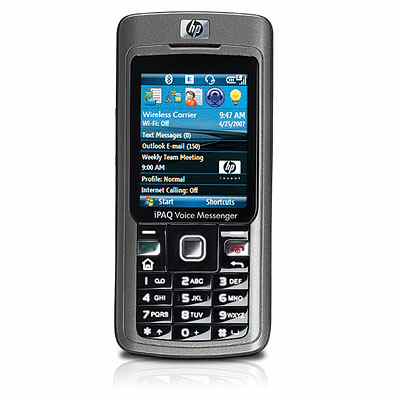
HP iPAQ 510 Voice Messenger Main Specifications –
– Windows Mobile® 6 Standard Pocket versions of Microsoft software are included (Outlook Mobile, Office Mobile and Internet Explorer
– 2.0 inch micro-reflective color TFT display, 176 x 220, 65K colors
– 64 MB SDRAM, 128 MB ROM
– Micro SD slot
– Quad band GSM/GPRS / EDGE (GSM 850, E-GSM900, DCS1800, PCS1900 MHz)
– EDGE
– OMAP 850 200 MHz processor
– Calendar, Contacts, Tasks, Voice Recorder, Notes, Pocket Internet Explorer, Windows Media Player 10 (MP3, audio and video streaming), Calculator, Solitaire, Bubble Breaker, Inbox (with Spell Checker for email), File Explorer, VoIP client, Bluetooth Manager, Terminal Services Client, VPN Client, Clock, Memory, Volume control. Word, Excel and Power Point, Microsoft DRM, SIM Toolkit
– 107.0 x 48.6 x 16.3 mm
– 102.0 g
Comments
3 thoughts on “HP iPAQ 510 Voice Messenger Phone is pretty smart”
Hi. how do i listen to MP3 music using the micro sd and how do i activate the option to send sms ?
tnx
once u insert the micro sd card, the best way to copy music is to use a card reader. this card reader is read by a pc as a mas storage device and u can copy mp3 songs frpm ur pc ontocard.
isnt in this system mobile trackor is there to protect my cell from theft