
Touch-screen patent filed for by Sony Ericsson
Sony Ericsson has filed a patent entitled “Orientation based multiple mode mechanically vibrated touch-screen display,” (now that’s a mouthful). It describes a tech that can sense the orientation of the handset’s display then change the configuration of the mechanically vibrating touch-screen display.
Sony Ericsson’s application includes diagrams which show a mobile handset in sporting game layout, and landscape orientation, with the touch-screen showing gaming controls similar to that of a PSP, and SE even mention the PSP in their application.
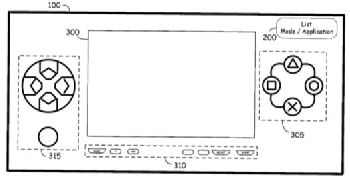
Quoting Sony Ericsson’s application:
“A system and method is disclosed for reconfiguring the graphical user interface (GUI) of a mechanically vibrated touch-screen display associated with a portable mobile communications device that is operable in a variety of modes.”Â
“An orientation sensing mechanism senses whether the portable mobile communications device is currently in a portrait or landscape orientation. An orientation sensing application accesses an orientation profile that associates each mode of operation with either a portrait or landscape orientation and determines which mode of operation is the default mode for the sensed orientation of the portable mobile communications device”
 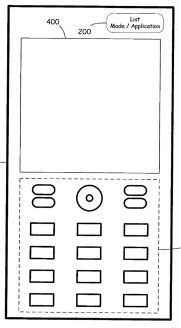
So what does this all mean? Well, turn the handset on its side and the touch-screen could possibly reconfigure to show gaming or media controls, and turning the handset upright, the touch-screen reconfigures to allow text messaging, voice calls, or web surfing. This idea is somewhat obvious, but aren’t all the best ideas?
Source — sefanatics
Live Comment
Your email address will not be published.